
CRM Management
Manage enquiries, leads, follow-ups, opportunities and customer relationships with complete history and reminders.
- Lead and opportunity tracking
- Follow-up scheduling and reminders
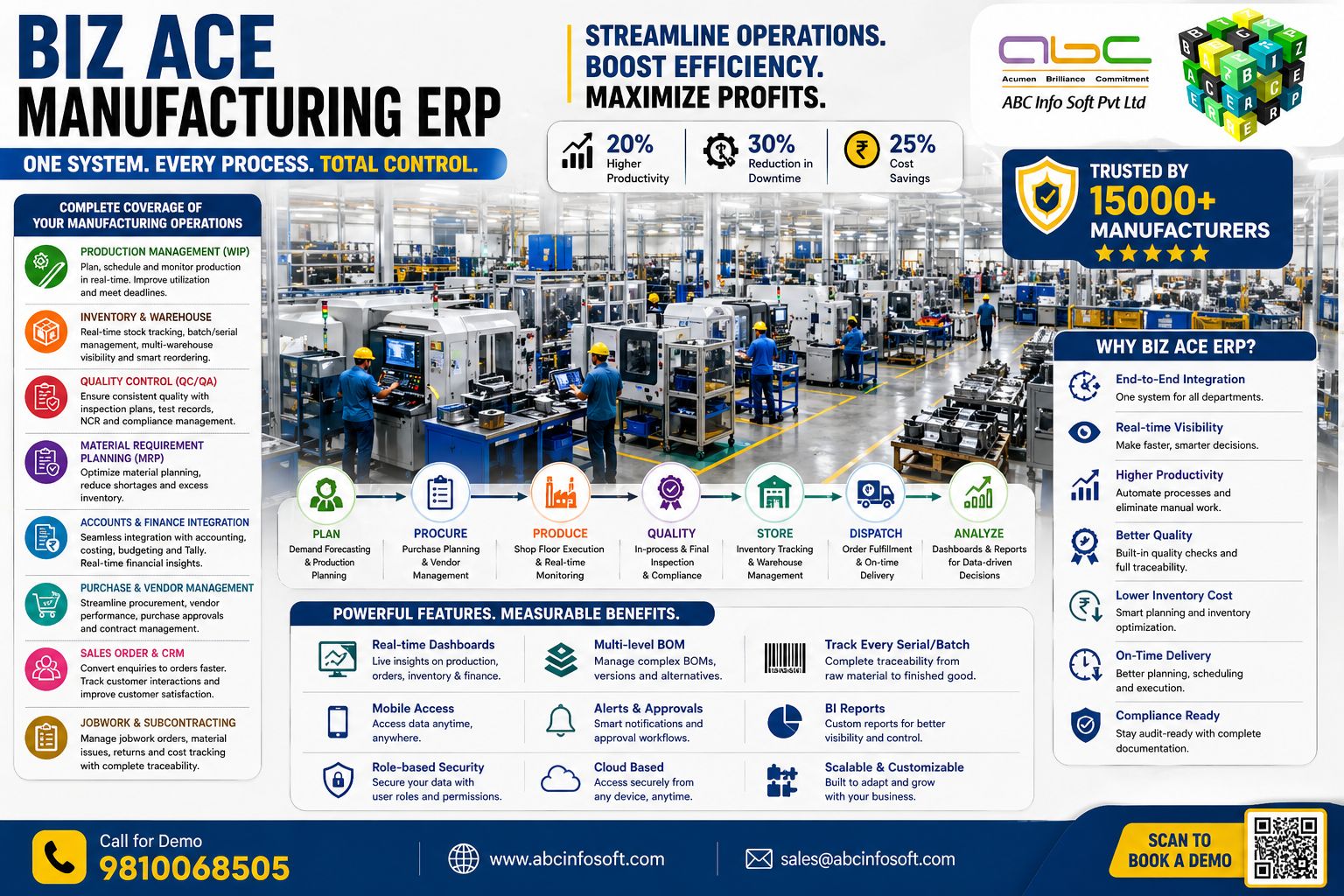
Separate modules for each department, connected through one real-time manufacturing ERP platform.


Each module is designed around real factory workflows and can be customized to match your business process.
Manage enquiries, leads, follow-ups, opportunities and customer relationships with complete history and reminders.

Control quotations, revisions, sales orders, dispatches, sales invoices, receipts and customer sales MIS.

Streamline purchase requests, vendor quotations, comparison, purchase orders, GRN, rejection and purchase invoices.

Track stock across stores and warehouses with item ledger, batch, serial, issue, return, reorder and valuation reports.

Plan raw material and consumable requirements from sales orders, production plans, BOM, stock and lead times.

Plan, schedule, execute and monitor production with job cards, shop-floor updates, manpower and machine allocation.

Maintain inward, in-process and final QC with inspection parameters, test records, NCR and corrective actions.

Define and manage multi-level bills of material, subcomponents, process routing and planned vs actual consumption.

Manage customer material received for processing, inward job work orders, production stages, billing and dispatch back.

Issue material to contractors, track outward job work orders, wastage, rejection, receipt and contractor billing.

Control expenses, cost heads, receipts, payments, cash flow, day book, trial balance, P&L and financial MIS.

Track machines, tools and assets with preventive maintenance, breakdowns, renewals, utilization and cost analysis.

Manage employees, attendance, leave, loans, salary structures, wages, deductions, payroll and statutory HR records.

Assign tasks, set priorities, add attachments, define deadlines, track delayed work and monitor accountability.

Connect ERP operations with Tally-ready finance workflows and reduce duplicate data entry across accounts teams.
Biz Ace ERP connects demand forecasting, sales order demand, BOM, current stock and purchase requirements so your production team can plan material, manpower, machines and process stages with confidence.
Component traceability, serial number control and BOM accuracy.

Lot tracking, production stages and order-wise delivery control.

Shop-floor control, machine utilization and dispatch planning.
Purchase, inventory, finance, sales and multi-location control.
Biz Ace Manufacturing ERP is a customized ERP system for manufacturing companies. It connects CRM, MRP, BOM, purchase, inventory, production, quality, job work, finance, Tally integration, HR, assets and reports in one platform.
It means Biz Ace can be configured around your actual manufacturing workflow, approval rules, item structure, departments, reports and user roles instead of forcing a fixed generic process.
Yes. Biz Ace can calculate material requirements from sales orders, production plans, BOM, current stock, reorder levels and pending purchase or issue quantities.
Yes. It supports multi-level BOM, subcomponents, process-wise consumption, routing, planned consumption, actual consumption and variance reporting.
Yes. Biz Ace tracks material issued to contractors, job work orders, material receipt after processing, wastage, rejection, deductions, GST, TDS, hold and retention details.
Yes. It can track customer material received for processing, inward job work orders, production stages, billing and final dispatch back to customer.
Yes. Biz Ace can be aligned with Tally-ready finance workflows to reduce duplicate entry and connect operational transactions with accounting requirements.
Yes. Inventory can be tracked by batch, serial number, lot, warehouse, item ledger, issue, return, GRN, rejection, stock valuation and reorder level.
Yes. It supports inward QC, in-process QC, final QC, quality parameters, inspection records, rejection, NCR and corrective action tracking.
Yes. It is designed for multiple companies, units, factories, warehouses, stores and departments with role-based access.
Biz Ace is suitable for electronics, garments, engineering, fabrication, process manufacturing, job work units, trading and multi-location manufacturing businesses.
Both deployment options can be discussed. Cloud helps with remote access, while on-premise suits businesses that want local hosting and greater control.
Yes. It provides dashboards and MIS reports for sales, purchase, stock, production, quality, machines, finance, HR, task status and management review.
Yes. Master data and opening balances can be migrated after data review, mapping, cleanup and validation.
Yes. ABC Info Soft provides implementation assistance, user training, post-go-live support and customization support.
Use the enquiry form, contact page or WhatsApp button. The team will connect with you for a personalized Biz Ace ERP demo.
One System. Every Process. Total Control. Your own Customised ERP.